The screens your operation runs on, built around how you actually work.
Spreadsheets and generic admin panels break down once orders, money and people move fast. I build the order views, finance dashboards, stock screens and call-center tools your team opens every day — one place, your data, your rules.
One screen per job, instead of ten tabs and a spreadsheet.
Your team sees the right orders, the real margin and the live stock without exporting, copy-pasting or waiting for someone to rebuild the report. For operators, managers and call-center agents who need to act on data, not just look at it.
What a build usually includes
- Order views with the filters, statuses and bulk actions your workflow needs
- Finance and margin dashboards built on reconciled numbers, not estimates
- Stock and depletion screens so you reorder before you run out
- Call-center screens that put confirmation, address and history on one page
- Role-based access so each person sees only what they should
- Live sync with your stores, carriers and messaging, no manual exports
- Clean, documented code you own, hosted where you choose
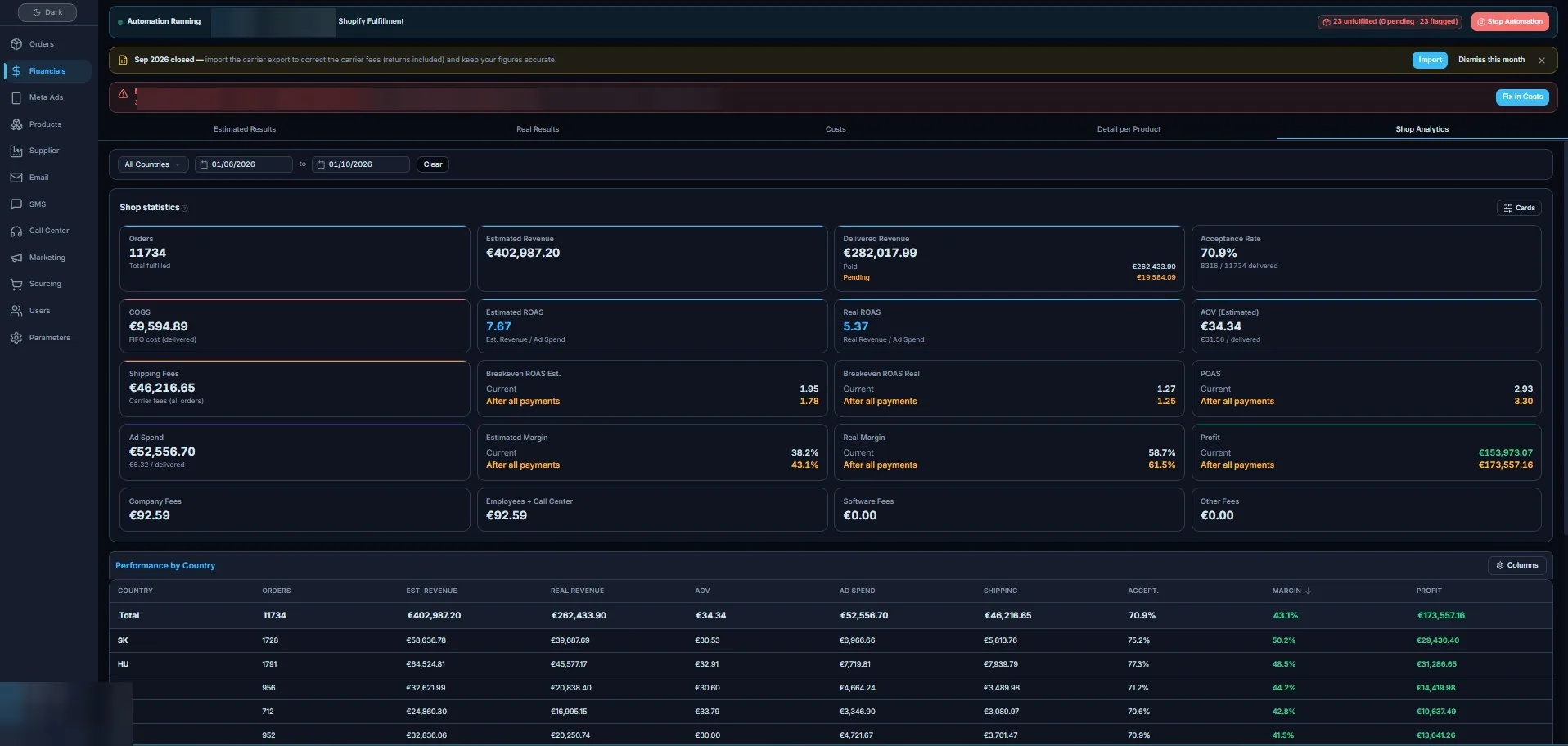
Tools for the parts of the business that move money.
Each one starts from a real bottleneck your team hits every day, not a feature list.
Order & fulfilment views
See every order in one list, filter by status, carrier or country, and act in bulk — confirm, route, flag or export without leaving the screen.
Get a custom quote →Margin & finance dashboards
Revenue, costs, carrier fees and returns reconciled into the margin you actually keep, broken down by store, product or market.
Get a custom quote →Stock & call-center screens
Depletion forecasts that warn before you run out, and agent screens that show confirmation, address and order history on a single page.
Get a custom quote →A fixed scope and a clear price before anything is built.
No hourly guessing and no surprise invoice. We agree on exactly what the tool does, then I quote it.
- You tell me the job the tool has to do and who uses it
- I map the screens, data and integrations into a written scope
- You get one fixed quote and a delivery window for that scope
- I build it, you review it as it comes together, and you own the code
Before you ask for a quote.
Will this replace the tools we already use?
Usually not all of them. The dashboards sit on top of the stores, carriers and messaging you already have and pull their data together. I replace the spreadsheets and manual exports, not the systems that work.
Who owns the code?
You do. The code is yours, documented, and hosted wherever you choose. There is no platform you are locked into and no per-seat licence to me.
Can it connect to our existing data?
Yes. The tools are built to sync with your stores, carriers, payment and messaging through their APIs or webhooks, so the numbers on screen stay live instead of being pasted in by hand.
How long does a first tool take?
It depends on the scope we agree on, which is why I quote a delivery window with the price. A focused order view or dashboard is far quicker than a full operations suite, and we can start with the screen that hurts most.
What happens after it is delivered?
You can run it yourself since you own the code, or keep me on for changes and new screens as the operation grows. Either way you are not stuck waiting on me to use it.
Tell me the screen your team wishes it had.
Describe the job and who uses it, and I will come back with a fixed scope and quote.